

FortiGate has built in SD-WAN functionality that can be used with both direct internet access and site-to-site VPNs. There is no license for this functionality and it only needs to be configured with rules that are relevant to your organization. SD-WAN is a critical piece of Fortinet’s IPsec site-to-site functionality and ensures only healthy links are used for communication. ADVPN can be layered on top of IPsec SD-WAN to allow for spoke-to-spoke communication via direct shortcuts rather than hair pinning through the hub in traditional hub and spoke topologies.
Fortinet utilizes two proprietary functions to achieve SD-WAN with link monitoring in IPsec configuration – Route Map Preferable and Route Priority. Route Map Preferable allows for two route-maps to be applied to a BGP neighbor. If the SD-WAN member health check is alive and within your defined SLA route-map-out-preferable will be utilized. If the health check exceeds the SLA or completely fails FortiGate will fall back to the route-map specified in the standard route-map-out statement. BGP communities are tied to these route-maps at the spoke and advertised to the hub. The hub maps the received communities to Route Priority and inserts them into the routing table. Route Priority allows the hub to insert multiple otherwise equal routes into the routing table but still prefer the route with the lowest Route Priority.
One additonal Fortinet technology worth mentioning is FortiManager (FMG). This lab was constructed manually but FortiManager enables this deployment at scale. FMG has templates to build this configuration for multiple hubs and spokes as needed. It also leverages variables to be able to reduce spoke configuration in FMG. Spoke details can be imported via CSVs and then added to the SD-WAN templates. FMG centralizes policy management for the spokes allowing one package to be created vs creating the same policies on spokes.
Topology
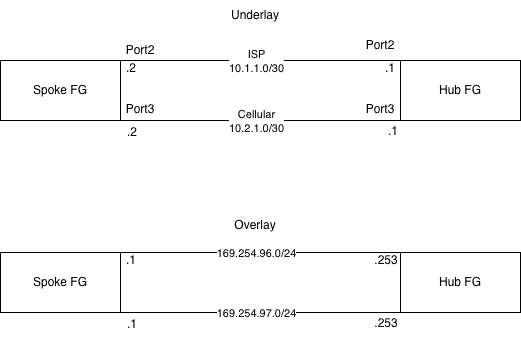
The topology used in this demonstration involves two FortiGates directly connected with two links. This is representative of a spoke FG connecting to a hub FG via two transports – 1 may be standard internet connectivity via a local ISP and the second may be cellular backup. IPsec tunnels are then constructed as overlay networks. BGP peering is achieved through the IPsec tunnels.
IPsec
Normal operation in this lab prefers the ISP tunnel but to enable fast failover the IPsec tunnel and BGP peering can be established via cellular concurrently. The hub is configured to accept dial up connections from spokes to help simplify configuration. This means that only the spokes need to be configured with the public IP address of the hub in the phase-1 tunnel configuration. If the spokes have a standard ISP and cellular connections their IP addresses may not be reserved and may change periodically which would require editing of the hub tunnel configuration without this feature. It would also mean hubs would need each spoke configured as an IPsec peer manually.
The hub is configured to hand out IP addressing for spoke tunnels like DHCP; this further simplifies the IPsec configuration on the spokes eliminating the need to IP address the tunnels manually. BGP peering is then built on the IPsec tunnels.
Spoke Config
config vpn ipsec phase1-interface
    edit "Hub1-VPN1"
        set interface "port2"
        set ike-version 2
        set peertype any
        set net-device disable
        set mode-cfg enable
        set proposal aes256-sha256
        set dhgrp 20 21
        set network-overlay enable
        set network-id 1
        set transport auto
        set remote-gw 10.1.1.1
        set psksecret <psk here>
    edit "Hub1-VPN2"
        set interface "port3"
        set ike-version 2
        set peertype any
        set net-device disable
        set mode-cfg enable
        set proposal aes256-sha256
        set dhgrp 20 21
        set network-overlay enable
        set network-id 2
        set transport auto
        set remote-gw 10.2.1.1
        set psksecret <psk here>
    next
end
config vpn ipsec phase2-interface
    edit "Hub1-VPN1"
        set phase1name "Hub1-VPN1"
        set proposal aes256-sha256
        set dhgrp 20 21
    next
    edit "Hub1-VPN2"
        set phase1name "Hub1-VPN2"
        set proposal aes256-sha256
        set dhgrp 20 21
    next
end
Hub Config
config vpn ipsec phase1-interface
    edit "VPN1"
        set type dynamic
        set interface "port2"
        set ike-version 2
        set peertype any
        set net-device disable
        set mode-cfg enable
        set proposal aes256-sha256
        set dpd on-idle
        set dhgrp 20 21
        set network-overlay enable
        set network-id 1
        set transport auto
        set ipv4-start-ip 169.254.96.1
        set ipv4-end-ip 169.254.96.252
        set ipv4-netmask 255.255.255.0
        set psksecret <psk here>
    next
    edit "VPN2"
        set type dynamic
        set interface "port3"
        set ike-version 2
        set peertype any
        set net-device disable
        set mode-cfg enable
        set proposal aes256-sha256
        set dpd on-idle
        set dhgrp 20 21
        set network-overlay enable
        set network-id 2
        set transport auto
        set ipv4-start-ip 169.254.97.1
        set ipv4-end-ip 169.254.97.252
        set ipv4-netmask 255.255.255.0
        set psksecret <psk here>
        set dpd-retryinterval 60
    next
end
config vpn ipsec phase2-interface
    edit "VPN1"
        set phase1name "VPN1"
        set proposal aes256-sha256
        set dhgrp 20 21
    next
    edit "VPN2"
        set phase1name "VPN2"
        set proposal aes256-sha256
        set dhgrp 20 21
    next
end
SD-WAN
The spoke is configured with a health check against a loopback configured on the hub FG. There is no need to configure a route from the spoke to hub loopback; SD-WAN will use the member IP addresses as the source IP and use the SD-WAN member interface for the health check automatically. The health check can be configured with an acceptable SLA for your use case and will mark the SD-WAN out of SLA accordingly.
Once BGP neighbors are configured, SD-WAN neighbors can be configured. SD-WAN neighbors are configured with the same BGP neighbor IP addresses (IPsec tunnel IPs at Hub), health check, and SLA. SD-WAN neighbors must be configured on the FG CLI. SD-WAN neighbors allow for the use of route-map-out and route-map-out preferable.
There is no SD-WAN configuration for hubs; the hub relies on the advertised BGP communities by the spoke for route priority application and path selection. Setting the preferred IPsec tunnel at the spoke and then using the dynamic route-map community assignment allows for the same path to be used at both ends of the topology preventing asymmetric routing.
Spoke Config
config system sdwan
    set status enable
    config zone
        edit "virtual-wan-link"
        next
        edit "Hub1"
        next
    end
    config members
        edit 1
            set interface "Hub1-VPN1"
            set zone "Hub1"
        next
        edit 2
            set interface "Hub1-VPN2"
            set zone "Hub1"
        next
    end
    config health-check
        edit "Hub1HC"
            set server "172.16.1.1"
            set update-static-route disable
            set members 1 2
            config sla
                edit 1
                    set link-cost-factor latency jitter packet-loss
                    set latency-threshold 50
                    set jitter-threshold 20
                    set packetloss-threshold 2
                next
            end
        next
    end
    config neighbor
        edit "169.254.96.253"
            set member 1
            set health-check "Hub1HC"
            set sla-id 1
        next
        edit "169.254.97.253"
            set member 2
            set health-check "Hub1HC"
            set sla-id 1
        next
    end
end
Route-Maps and Community-Lists
The spoke configuration uses three route-maps to set a community on routes before advertising them to the hub. When SLAs are met, the advertised routes are set to community 65000:1 for ISP and 65000:2 for cellular via route-maps Priority-1 and Priority-2 respectively. If the SLA is exceeded on either tunnel the community is changed to 65000:9999 via the Priority-9999 route-map. The route-map default in BGP is Priority-9999 and the route-map-out-preferable is Priority-1 for ISP and Priority-2 for cellular. Route-map-out-preferable will be used if the link is performing within the SD-WAN SLA configured.
The hub configuration utilizes a community-list to interpret the spoke communities. It then has route-map-in configured for BGP neighbors to match the community-list and then set the route priority that matches.
Spoke Config
config router route-map
    edit "Priority_9999"
        config rule
            edit 1
                set set-community "65000:9999"
                unset set-ip-prefsrc
            next
        end
    next
    edit "Priority_1"
        config rule
            edit 1
                set set-community "65000:1"
                unset set-ip-prefsrc
            next
        end
    next
    edit "Priority_2"
        config rule
            edit 1
                set set-community "65000:2"
                unset set-ip-prefsrc
            next
        end
    next
end
Hub Config
config router community-list
    edit "Priority_1"
        config rule
            edit 1
                set action permit
                set match "65000:1"
            next
        end
    next
    edit "Priority_2"
        config rule
            edit 1
                set action permit
                set match "65000:2"
            next
        end
    next
    edit "Priority_9999"
        config rule
            edit 1
                set action permit
                set match "65000:9999"
            next
        end
    next
end
config router route-map
    edit "RM-VPN-Priority"
        config rule
            edit 1
                set match-community "Priority_1"
                unset set-ip-prefsrc
                set set-priority 1
            next
            edit 2
                set match-community "Priority_2"
                unset set-ip-prefsrc
                set set-priority 2
            next
            edit 3
                set match-community "Priority_9999"
                unset set-ip-prefsrc
                set set-priority 9999
            next
        end
    next
end
BGP
Spokes are configured to peer with the IPsec tunnel headend IP addresses at the Hub. The Hub BGP configuration accepts peering requests within the tunnel IP subnet to compliment the automatic addressing of spoke IPsec tunnels. This means that static neighbor configuration is eliminated at the Hub. Hubs are also configured with multi-path support so that the multiple routes received via the IPsec tunnels of a spoke can exist in the hub routing table. Without this configuration only one route would be added to the routing table via the BGP route selection process. Although the traditional metrics for ECMP will be met, only the route with the lowest route priority will be utilized in FG. The spoke configuration also lists the two route-map-out statements discussed earlier that will align with our SD-WAN health checks. Spoke advertisement interval is reduced to 1 second to enable quick notification for a route that has a route-map changed. FortiGate will wait 30 seconds by default to advertise a BGP route change and will cause an undesired delay.
Spoke Config
config router bgp
    set as 65000
    config neighbor
        edit "169.254.96.253"
            set advertisement-interval 1
            set capability-graceful-restart enable
            set link-down-failover enable
            set soft-reconfiguration enable
            set description "Hub1-VPN1"
            set interface "Hub1-VPN1"
            set remote-as 65001
            set route-map-out "Priority_9999"
            set route-map-out-preferable "Priority_1"
            set connect-timer 10
        next
        edit "169.254.97.253"
            set advertisement-interval 1
            set capability-graceful-restart enable
            set link-down-failover enable
            set soft-reconfiguration enable
            set description "Hub1-VPN2"
            set interface "Hub1-VPN2"
            set remote-as 65001
            set route-map-out "Priority_9999"
            set route-map-out-preferable "Priority_2"
            set connect-timer 10
        next
    end
    config network
        edit 1
            set prefix 172.17.1.0 255.255.255.0
        next
    end
    config redistribute "connected"
    end
    config redistribute "rip"
    end
    config redistribute "ospf"
    end
    config redistribute "static"
    end
    config redistribute "isis"
    end
    config redistribute6 "connected"
    end
    config redistribute6 "rip"
    end
    config redistribute6 "ospf"
    end
    config redistribute6 "static"
    end
    config redistribute6 "isis"
    end
end
Hub Config
config router bgp
    set as 65001
    set ebgp-multipath enable
    config neighbor-group
        edit "VPN1"
            set capability-graceful-restart enable
            set link-down-failover enable
            set next-hop-self enable
            set soft-reconfiguration enable
            set remote-as 65000
            set route-map-in "RM-VPN-Priority"
        next
        edit "VPN2"
            set capability-graceful-restart enable
            set link-down-failover enable
            set next-hop-self enable
            set soft-reconfiguration enable
            set remote-as 65000
            set route-map-in "RM-VPN-Priority"
        next
    end
    config neighbor-range
        edit 1
            set prefix 169.254.96.0 255.255.255.0
            set neighbor-group "VPN1"
        next
        edit 2
            set prefix 169.254.97.0 255.255.255.0
            set neighbor-group "VPN2"
        next
    end
    config redistribute "connected"
    end
    config redistribute "rip"
    end
    config redistribute "ospf"
    end
    config redistribute "static"
    end
    config redistribute "isis"
    end
    config redistribute6 "connected"
    end
    config redistribute6 "rip"
    end
    config redistribute6 "ospf"
    end
    config redistribute6 "static"
    end
    config redistribute6 "isis"
    end
end
Lab Environment
The spoke FG is configured with a health check in Network & Interfaces > SD-WAN. The IP address specified for the server is the loopback on the hub FG. Both links are meeting their SLA currently:
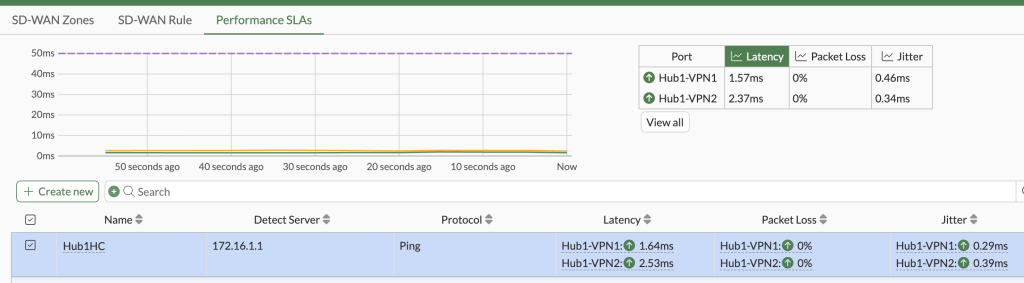
Checking the hub routing table reflects both routes in the table with route priorities of 1 for the ISP tunnel and 2 for cellular tunnel. The hub will use the route with the lowest priority despite both being in the table.

On the hub, I created a policy to block traffic from the ISP IPsec tunnel to the health check loopback. This causes the health check on the ISP tunnel to fail at the spoke. The spoke BGP configuration then changes from route-map-out-preferable to the standard route-map-out with the higher community. The hub receives this new community and changes the route priority accordingly. Both routes still exist in the routing table since the actual IPsec tunnel between the spoke and hub via the ISP is up. However, the ISP tunnel will no longer be used since it does not meet the SLA and the cellular tunnel with route priority two will be used.

Finally, after disabling the policy that blocked the ISP health check it returns to meeting the SLA again and the route-map-out-preferable is utilized. The hub routing table shows the preferred priorities again.

Route-map-out and route-map-out-preferrable are powerful tools and can be used for more than swapping communities. This solution at scale allows for dynamic connections across sites with the best performing links being utilized to provide the best end user experience. The relevant configuration sections have been added to my GitHub.